


SingleCare - Rx Coupons
4.65.13K Reviews
App Specs
- Version
- 7.0.8
- Updated On
- License
- Free
- Downloads
- 1,000,000+
- Developer
- RxSense
- Categories
- Medical
- Platform
- Android, iOS
Screenshots
 Analysis by AppCompare
I find prescription shopping most stressful when I’m already on the way to the pharmacy and only then wonder whether the price could be lower somewhere else. SingleCare - Rx Coupons is built around checking that question before you pay: search for a medication, compare participating local pharmacy prices, and use a coupon at the counter. That makes it a practical medical app for people who pay attention to prescription costs, though it works best when you treat its displayed price as something to verify for your exact purchase rather than a guaranteed final bill.
Why a connection matters before you leave
The app’s central task depends on current, location-relevant information: you search for a medication and look at nearby pharmacy options and their prices. In practice, I’d do that while connected and before setting out, rather than waiting until I’m standing in a checkout line. That gives me time to compare choices and decide whether a different pharmacy is worth the trip.
A useful habit is to search using the medication name on the prescription, then check that the result corresponds to the form and strength you need. A familiar drug name alone may not be enough to make two options comparable. I’d also keep the pharmacy and coupon details available when I arrive, so I’m not trying to repeat a search in a busy store or with a weak signal.
This kind of lookup is different from opening a pharmacy’s own app to refill a prescription. SingleCare is useful for comparing discount prices across pharmacies; it isn’t a substitute for the pharmacy’s process for managing your prescription or confirming that it is ready. I see the two as tools for different jobs: one helps me shop for a price, while the pharmacy handles the prescription itself.
Useful on errands, less useful as a last-second promise
For a routine refill, I’d compare prices before choosing where to go, then use the result to plan the errand. If the lowest price is at a pharmacy I’m already passing, that can be an easy decision. If it means a separate drive, I’d weigh the possible saving against the time and travel. A low displayed price isn’t automatically the best overall choice if getting it costs more effort than it saves.
There’s also a real trade-off when you’re unwell or helping someone else. Comparing options can be worthwhile, but it may not be practical when a medication is urgently needed or the patient has already arranged collection at a particular pharmacy. In that situation, I’d prioritize getting clear information from the pharmacy and avoid delaying care just to chase a different price.
SingleCare is free, and it is developed by RxSense. It is listed in the medical category, is rated for Everyone, and has a 4.5 average from around 10,000 ratings. More than 1 million installs suggest it has reached a broad audience, while its release date of April 20, 2016 and current version 7.0.6 place it among established apps rather than a brand-new service. The minimum operating-system requirement is version 7.0.
Worth Reading Before You Choose

EA SPORTS FC Mobile 26 Is a Bigger Football Game, but It Takes Time

Flipboard Shows What News Apps Must Do Beyond the Feed

Switching to Android Auto Means Rethinking Your Driving Routine

Google Calendar Makes a Crowded Week Easier to Manage

Ludo King Makes the Most of the Minutes Between Plans

Baby Panda World Brings Quick Play to Modern Phones, but Its Game Library Feels Busy
Discovering the Savings
Have you ever been hit with a jaw-dropping prescription bill and wished there was a way to soften the blow? Well, let me tell you about SingleCare - Rx Coupons. I stumbled upon this little gem of an app, and it’s been a game-changer in my quest to save on medical expenses. Here’s the lowdown on what it’s all about.
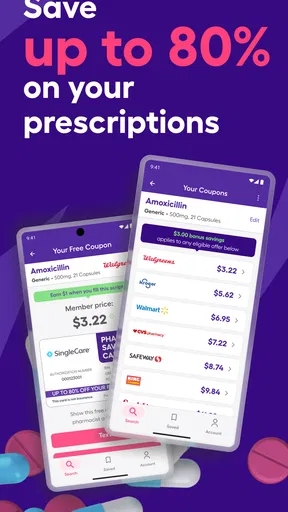
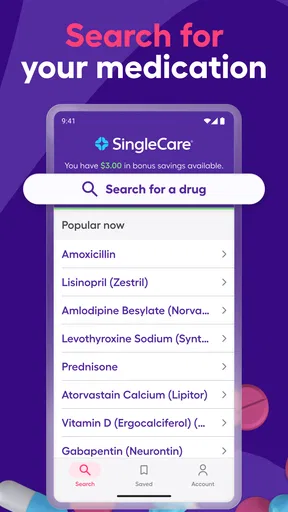
When I first downloaded SingleCare, I was a bit skeptical. I mean, how much could an app really help me save on prescriptions? But let me tell you, it’s like having a coupon fairy right in your pocket. The app is super easy to navigate. Right from the home screen, you can search for medications by name. Once you pop in what you're looking for, the app quickly pulls up a list of local pharmacies and the prices you can expect to pay with the app’s discounts.
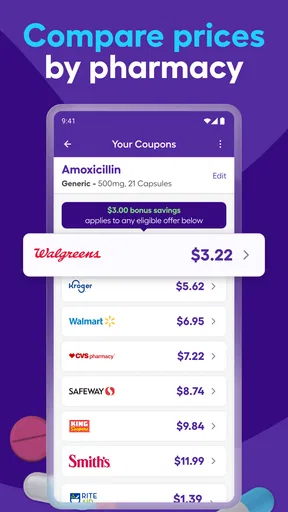
One of the most delightful features is being able to compare prices across different pharmacies. It’s like Travelocity, but for medicine! You just pick the pharmacy with the best price, show the coupon at checkout, and voilà—your bill is significantly lower. No membership fees, no hidden costs. It’s just straight-up savings.
User-Friendly Experience
Let’s talk about the user experience. I’m no tech wizard, but navigating SingleCare is a breeze. The interface is clean and straightforward. You’ve got your search bar, a list of medications, and pharmacy maps all logically arranged. Plus, it doesn’t bombard you with ads, which is a huge plus in my book.
For those of us who need a little extra help, there's an extensive FAQ section that answers just about any question you might have. Plus, they’ve got a support team that’s quick to respond if you run into any snags.
Perks and Benefits
Now, you might be wondering, "What's the catch?" Honestly, there isn’t one. The app partners with pharmacies to offer discounted prices, and that’s really it. No strings attached. The savings are applicable to a broad range of medications, from your everyday prescriptions to more specialized treatments. It’s a win-win situation.
Another neat feature is that the app doesn’t require any personal data beyond the basics. Privacy, especially when it comes to health, is a big deal, and SingleCare respects that. You don’t need to worry about your information being sold or misused.
Keeping the price check practical
The best way I’d use a coupon is as a conversation starter at the pharmacy, not as a reason to assume the transaction is settled before it begins. I’d show the coupon and confirm that the medication details match the prescription. If the amount at checkout differs from what I expected, I’d ask the pharmacist to check the details before deciding what to do. That small pause can prevent confusion, especially when I’m comparing similar-looking medication names or shopping on someone else’s behalf.
Another useful approach is to compare the discount with the way you normally pay. A coupon price and an insurance price may not be interchangeable, so I would ask the pharmacy which option applies to this purchase and what the total will be. The right choice depends on the individual prescription and payment situation; I wouldn’t assume that the lowest number on a comparison screen must be the best route for everyone.
If I’m helping a family member, I’d do the search with them and make sure the coupon is easy to present when they collect the medication. That is more reliable than sending only a screenshot without explaining which pharmacy and prescription it relates to. It also avoids a common practical mix-up: finding a promising result for one location, then arriving at another and expecting the same price.
When the screen, signal, or result gets in the way
Like any app that retrieves local options, the experience can be less convenient if the connection is unreliable or the location information doesn’t match where you plan to shop. I’d search again if I change neighborhoods, and I’d avoid relying on an old result after changing the selected pharmacy. If the app is slow, I’d step out of the checkout flow, reconnect, and try again before asking the pharmacy to process the coupon.
It’s sensible to have a simple backup plan: note the pharmacy you chose and keep the relevant coupon details accessible before you leave. That doesn’t mean assuming the app works without a connection; it means avoiding a rushed search at the counter. If the result still won’t load, calling the pharmacy or asking staff what information they need is more useful than repeatedly tapping the same screen.
The app also can’t make every pharmacy choice convenient. A price comparison may reveal a lower option farther away, but I’d factor in travel, opening hours, and whether the prescription can be filled there in time. When continuity with a familiar pharmacy matters more than saving a little, staying with that pharmacy may be the better decision. The value of comparison is having another option, not being obligated to take it.
Who benefits most from comparing
I’d recommend this approach to people who pay for prescriptions themselves, have recurring medications, or are willing to check more than one pharmacy before deciding. Even a quick comparison can make a routine errand more informed. It is also useful for caregivers who want to help someone weigh local choices, provided they confirm the exact medication and collection location with the person and pharmacy.
It may be less suitable for someone who needs a prescription immediately, cannot travel beyond one pharmacy, or expects an app to manage refills and medical records. Those needs call for direct contact with a pharmacy or a dedicated prescription-management service. SingleCare’s strength is price comparison and coupon use, not replacing clinical advice, a prescriber, or the pharmacy’s own fulfillment process.
Compared with checking pharmacy websites one at a time, a single search can make it easier to see alternatives side by side. Compared with asking a pharmacist only after arriving, checking beforehand gives you more time to choose where to go. The trade-off is that a comparison tool still requires you to verify the exact purchase details and decide whether another location is worth the inconvenience. I’d use it as a shopping aid, not as the final authority on what a prescription will cost.
User-Friendly Experience
Let’s talk about the user experience. I’m no tech wizard, but navigating SingleCare is a breeze. The interface is clean and straightforward. You’ve got your search bar, a list of medications, and pharmacy maps all logically arranged. Plus, it doesn’t bombard you with ads, which is a huge plus in my book.
For those of us who need a little extra help, there's an extensive FAQ section that answers just about any question you might have. Plus, they’ve got a support team that’s quick to respond if you run into any snags.
Perks and Benefits
Now, you might be wondering, "What's the catch?" Honestly, there isn’t one. The app partners with pharmacies to offer discounted prices, and that’s really it. No strings attached. The savings are applicable to a broad range of medications, from your everyday prescriptions to more specialized treatments. It’s a win-win situation.
Another neat feature is that the app doesn’t require any personal data beyond the basics. Privacy, especially when it comes to health, is a big deal, and SingleCare respects that. You don’t need to worry about your information being sold or misused.
Final Thoughts
In a world where medical costs can feel overwhelming, having a tool like SingleCare is invaluable. It’s an app that genuinely delivers on its promise to save you money. The ease of use, transparency, and genuine savings make it a must-have for anyone dealing with prescription costs.
So, if you haven’t tried it yet, I highly recommend giving it a shot. It’s free, it’s easy, and it could save you a ton of money. What’s not to love? Go ahead, download it, and start saving today!
Making a decision at the counter
One question I’d want answered before relying on a coupon is whether the amount I saw applies to the exact prescription being filled. I’d have the pharmacy check the medication, strength, quantity, and chosen location against the coupon before the sale is completed. If anything differs, I’d ask for the revised total rather than treating the earlier comparison as binding. That is particularly important when a clinician has changed a dose since the last refill.
I’d also decide in advance what matters most for that visit: lowest available price, convenience, or keeping the prescription at a pharmacy I already use. A comparison is most helpful when I know my priorities. If the price difference is small, a familiar location may be worth more than another trip; if the savings are meaningful to me, a different nearby pharmacy might make sense after I confirm it can fill the prescription.
A sensible role in a health routine
For recurring prescriptions, I would make checking prices part of planning the refill rather than waiting until the last dose. That gives me room to compare and contact the pharmacy if I have questions. I would not let the search delay a needed medication, though: when timing is tight, the practical next step is to speak directly with the pharmacy and follow the prescriber’s instructions.
SingleCare is best understood as a focused cost-comparison tool. It can help me find a coupon and consider local alternatives, but it does not decide which treatment is appropriate or replace professional guidance. That boundary is useful: I can use the app for the shopping question while leaving medical decisions and prescription handling to the people responsible for them.
Final Thoughts
In a world where medical costs can feel overwhelming, having a tool like SingleCare is invaluable. It’s an app that genuinely delivers on its promise to save you money. The ease of use, transparency, and genuine savings make it a must-have for anyone dealing with prescription costs.
So, if you haven’t tried it yet, I highly recommend giving it a shot. It’s free, it’s easy, and it could save you a ton of money. What’s not to love? Go ahead, download it, and start saving today!
Pros
- Easy to navigate user interface.
- Wide range of pharmacy partners.
- No membership fees required.
- Instant price comparison tool.
- Prescription refill reminders.
Cons
- Limited to U.S. pharmacies.
- No 24/7 customer support.
- Savings vary by location.
- Requires internet connection.
- No medication delivery service.
FAQs for SingleCare - Rx Coupons
What is SingleCare and how does it work?
SingleCare is a free app that provides users with access to prescription discounts and coupons. By searching for their medication within the app, users can compare prices at local pharmacies and apply savings at checkout. The app partners with pharmacies to offer competitive pricing, helping users save money on their prescriptions.
Do I need insurance to use SingleCare?
No, you do not need insurance to use SingleCare. The app functions independently of insurance plans, allowing anyone to access discounted prices on prescriptions. This makes it an excellent option for those without insurance or those whose insurance doesn’t cover certain medications.
Is SingleCare safe and legitimate to use?
Yes, SingleCare is a legitimate and safe service. It partners with reputable pharmacies across the United States to ensure users receive genuine medications at discounted rates. The app is widely used and trusted, with numerous positive reviews from users who appreciate the cost savings.
Can I use SingleCare at any pharmacy?
SingleCare is accepted at a wide range of pharmacies, including major chains like CVS, Walgreens, and Walmart, as well as many local independent pharmacies. However, it’s always best to check within the app to confirm that your preferred pharmacy accepts SingleCare before visiting.
How do I apply a SingleCare coupon at the pharmacy?
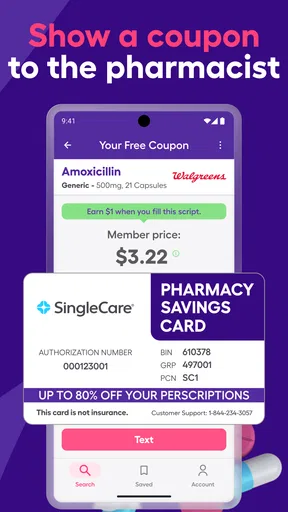
To use a SingleCare coupon, simply show the coupon information on your smartphone to the pharmacist at checkout. The pharmacist will enter the coupon details, and you’ll receive the discounted price. It’s a straightforward process that requires no printing or additional setup.


